
To translate a PDF document from French to English, upload a PDF with selectable text to a document translation tool. Set the source language to French and the target to English, then download the result.
Scanned pages need OCR first: it extracts text from the page images. For a book you want to read as an EPUB, convert the PDF before whole-book translation.
The right route depends on your file and how you want to read it. File preparation and a review of the English against the French help you check meaning in a book passage. Translated layouts can also shift, so they need a check too.
Choose the route that fits your PDF
Your route depends on whether you can select text in your PDF or its pages are scanned images. It also depends on the kind of file you need back.
PDF translation starts by taking the French text out of the file. The tool then translates it into English and rebuilds the document around it. English wording may take up more or less space than the French. This can shift line breaks, tables, and where pages end.
To check your file, try selecting a sentence and copying it into a plain-text editor. If the pasted text is readable, a tool can likely pull text from the PDF. This is called text extraction. A scanned page needs OCR, a process that turns text in an image into editable text. OCR does not translate it. Custom fonts and tightly packed columns can also jumble the text during extraction. Checking the copied text first helps you spot these problems before you proceed.
If you have the original Word or PowerPoint file, translate that source instead. Its paragraphs and text boxes can be edited. They give the tool a clearer structure to work with than the PDF.
Choose the tool by the output you need:
| Tool type | Best fit | What to expect |
|---|---|---|
| General document translation engine | An English document to download | Rebuilt formatting that still needs checking |
| Chatbot | Understanding a difficult passage | English text and explanations; it may not reproduce the pages |
| Browser extension | Reading French text on a page or viewer it supports | On-screen help; check whether you can save a translated file |
| Desktop converter | Preparing the file | Pulling out text, using OCR where supported, or making a file you can edit |
| Whole-book translator | Reading chapter by chapter from an EPUB, an ebook file format | A file built for reading rather than a copy of the PDF’s pages |
Before paying, check which file formats the free version supports and what files it lets you save. Its file-size or page limits matter too. A free preview is useful only if the paid version gives you the output you need. That might be an English PDF, a document you can edit, or an EPUB. Paying does not guarantee a better translation or keep the layout unchanged.
Translate your French file in four steps
For scanned pages, open the PDF in a desktop tool with OCR, such as Adobe Acrobat. Select French as the recognition language where available, then run text recognition. This adds text the translation tool can read.
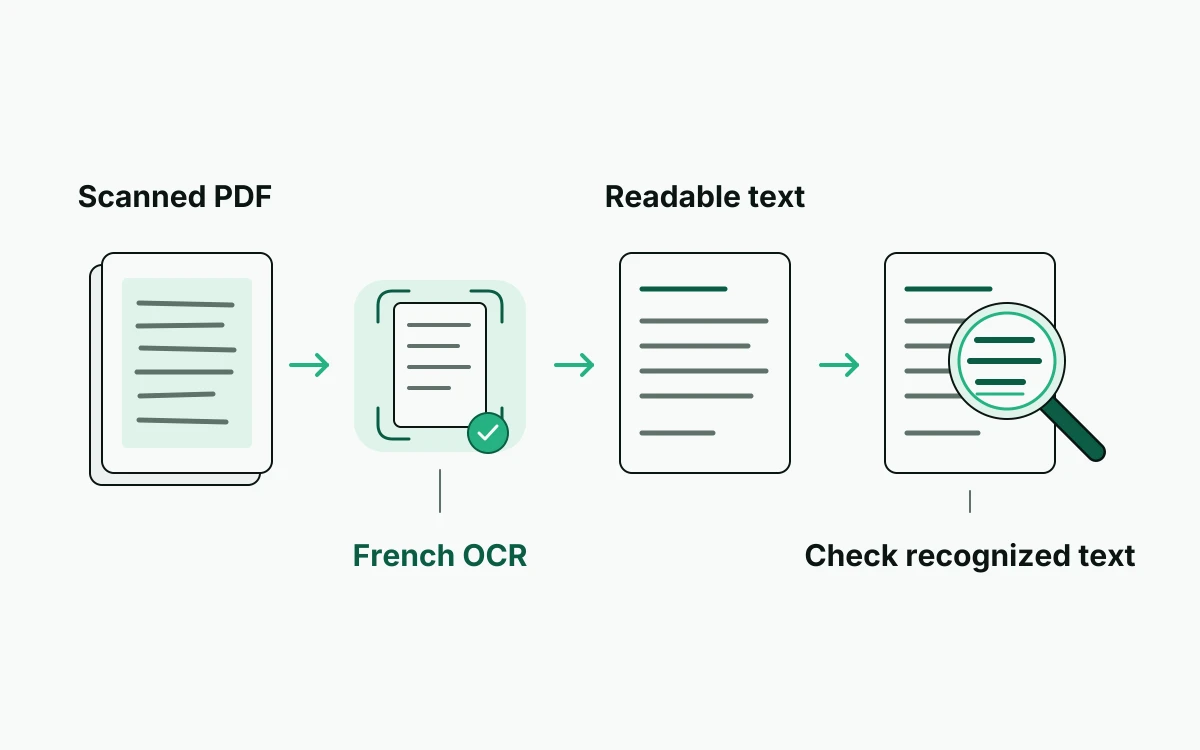
Check the recognized text against the scans for French accents, column order, and missing lines. Correct recognition errors before translating so they do not carry into the English version.
Save a searchable PDF or an editable document in a format your translation tool accepts. A searchable PDF keeps the scanned pages and adds selectable text. An editable document lets you correct text and formatting before uploading. Plain-text extraction will not preserve the original page layout.
Use the tool’s document translation option to get an English file you can download. Once your file is ready, follow these steps:
- Upload a PDF with text you can select, or the searchable PDF or editable document you saved after OCR. For example, select
roman-francais.pdfand wait for the upload to finish. - Set the languages to French → English. French should be the source language, meaning the language you’re translating from. English should be the target, meaning the language you want. Before starting, also check that the uploaded filename matches the file you meant to translate.
- Start the translation with the tool’s document translation command. This option is designed to produce a document you can download. Pasting the entire file into a chat takes you out of that process.
- Download the English result in one of the formats offered. Choose PDF if it’s offered and you need a document for reading. If you plan to make corrections, choose a format you can edit. Open the downloaded file to make sure it contains the translated text.
A French book passage translated into English
A good translation keeps the passage’s meaning, tone, and context without copying the French word order. Names and repeated terms should stay the same across chapters.
For example, you could convert a book file called roman-francais.pdf to roman-francais.epub, then set French → English. This shows the steps; it is not a tested translation.
Consider this sentence in a conversational scene:
| French original | Natural English |
|---|---|
| Il pleut des cordes. | It's pouring. |
The word-for-word version, “It's raining ropes,” loses the intended meaning: heavy rain. Machine translation can struggle with idioms, phrases whose meaning differs from their individual words. This is especially true when the surrounding passage gives few clues. “It's pouring” keeps both the weather and the casual tone.
In DualBook, the EPUB is translated chapter by chapter, carrying names and terms into later chapters to keep them consistent, with both languages available to read side by side.
When reviewing, compare the French paragraph with the English version. Does the speaker still sound casual, formal, angry, or hesitant? Correct grammar alone won't tell you that. A glossary, a list of names and chosen terms, helps you keep them consistent throughout. An idiom like this needs wording that fits the scene.
For your next EPUB steps, continue with How to Translate a Book with AI: From File to Reviewed EPUB.
Check these problems before reading or sharing the result
Before distributing or publishing a translated book, check its copyright status and license. If it is still protected and the license does not permit translation and distribution, ask the rights holder for permission; owning the PDF is not enough.
Before you rely on the English version, check page order and terms used in your field. Review any passages you marked as uncertain. If your PDF is confidential, read the service’s privacy policies before uploading it.
- Compare pages with complex layouts side by side with the French PDF. Pay attention to columns, captions, and oversized images. Text may have moved into the wrong column. Captions may have become separated from figures, or large images may have pushed paragraphs out of place. A simpler source file with fewer images and other layout elements can help, if one is available.
- Check terms used in your field against the surrounding text and your glossary, or list of terms. Legal, scientific, and business French each have their own words and formal writing rules. Documents from institutions also need checks for passages that mix languages. Check their standard wording for rules and regulations, too. A fluent English sentence can still use the wrong technical term.
- Before sending confidential material, read how the service handles uploaded files. Its policies should cover how long it keeps files, deletion, who can access them, and how it uses their content. Your organization may require an approved service or work done on your own computer. Those rules may apply to commercial terms, personal data, and unpublished research.
- Settle passages you marked as uncertain before sharing the result or paying for a publication review. Keep each passage beside its French source, with a note explaining the exact issue. This makes a missing sentence or a term used in different ways easier to review. Correct what you can verify, and send questions about your field that remain unanswered to a qualified reviewer. Readable English alone does not confirm the meaning.